How to Sign a PDF Online Free
Need to sign a PDF and send it back? Here is how to add your signature to a document online for free, without printing, scanning or creating an account. Everything happens in your browser, so your file is never uploaded.
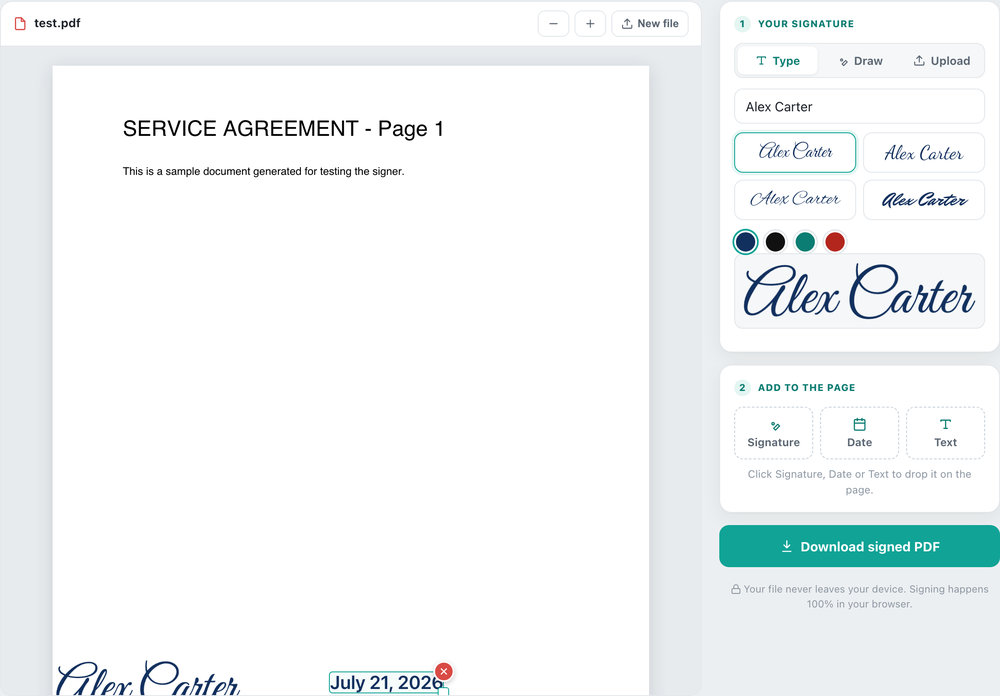
How to sign a PDF for free
The old way to sign a document was to print it, sign with a pen, scan it and email it back. With a free online PDF signer you can skip all of that and add a signature to a PDF in under a minute:
- Open your document. Upload the PDF (or an image) you need to sign. It opens right in the browser.
- Create your signature. Type your name and pick a handwriting style, draw your signature with a mouse or finger, or upload a photo of your signature.
- Place it on the page. Drag the signature onto the signature line, then resize it. You can also add a date or typed text.
- Download the signed PDF. Your electronic signature is baked into the file and saved to your device, ready to send back.
Draw, type or upload your signature
There are three easy ways to make a digital signature for your document. Type your name and choose a signature font for a clean look. Draw your signature freehand, which works great on a phone or tablet with your finger. Or upload a transparent PNG of a signature you already have. Whichever you pick, the signature is added as a real image on the page, so it looks handwritten on the final PDF.
Sign a PDF on your phone
Because it is a website and not an app, you can sign a PDF on iPhone or Android right in your mobile browser. The draw option lets you sign with your finger, and the signed file downloads straight to your phone. There is nothing to install and no sign-up.
Is it safe and private?
Yes. Unlike most e-sign services, this tool does not upload your document anywhere. Your PDF is opened locally, the signature is added on your own device, and when you close the tab it is gone. Nothing is stored on a server, which is exactly what you want for a contract or private form.
What you can sign
Use it to sign a contract, lease or rental agreement, NDA, offer letter, tax or consent form, invoice, waiver or permission slip. It works on any PDF, and on JPG or PNG images too. To sign a Word document, export or save it as a PDF first, then sign the PDF here.
It is a free, browser-based way to sign a document online free and add an electronic signature to a PDF, with no sign-up, no watermark and nothing ever uploaded.
Sign a PDF now
Draw, type or upload your signature and download the signed file. Free, no sign-up, nothing uploaded.
Open the Doc Signer →