How to Send a Password Securely
Sending a password over chat or email leaves it sitting in message history forever, where it can be forwarded, screenshotted or exposed in a breach. Here is the safe way to do it.
Why plain chat and email are risky
When you paste a password into WhatsApp, Slack or email, it stays in the conversation permanently. Anyone who later opens that chat, or gains access to either account, can read it. Messages get forwarded, backed up to the cloud, and included in data breaches. A password is only as safe as the least secure place it has ever been typed.
The safe method: a one-time secret link
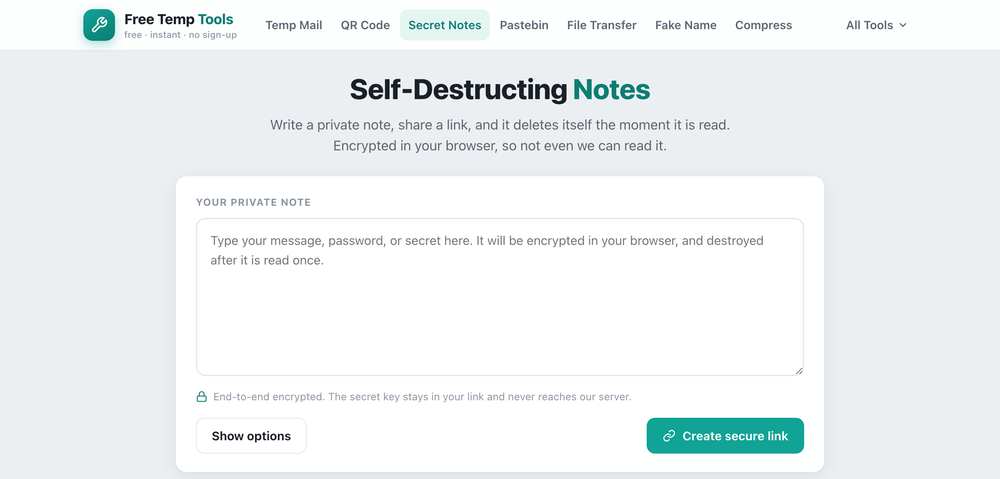
Instead of sending the password itself, send a link that reveals it once and then destroys it. The note is encrypted in your browser, so even the tool cannot read it, and the moment the recipient opens the link the secret is deleted for good. There is nothing left in any chat history to leak later.
Step by step
- Open the self-destructing notes tool and type the password, PIN or secret.
- Create the link and send it to the person who needs it.
- When they open it, they see the secret once, then it is gone.
Extra tips
- Share the link and any hint over different channels when you can, for example the link by email and a heads-up by text.
- Add a password to the note for a second layer, so the reader must also know a phrase you tell them separately.
- Tell the recipient to open it soon. An unread note expires on its own, so it will not sit around waiting to be found.
Pair this with a temporary email when you are signing up somewhere and do not want to hand over your real inbox.
It works as a free Privnote alternative for sending a one-time secret: a password, a WiFi code, an API key, a PIN, a recovery code or a private message that burns after reading.
Share a password safely
Write it once, share a one-time link, and it self-destructs after it is read.
Open Self-Destructing Notes →