How to Count Words and Characters Online
Whether you are hitting a word count for an essay, staying under a character limit on social media, or checking an SEO meta description, here is how to count words and characters online for free, right in your browser.
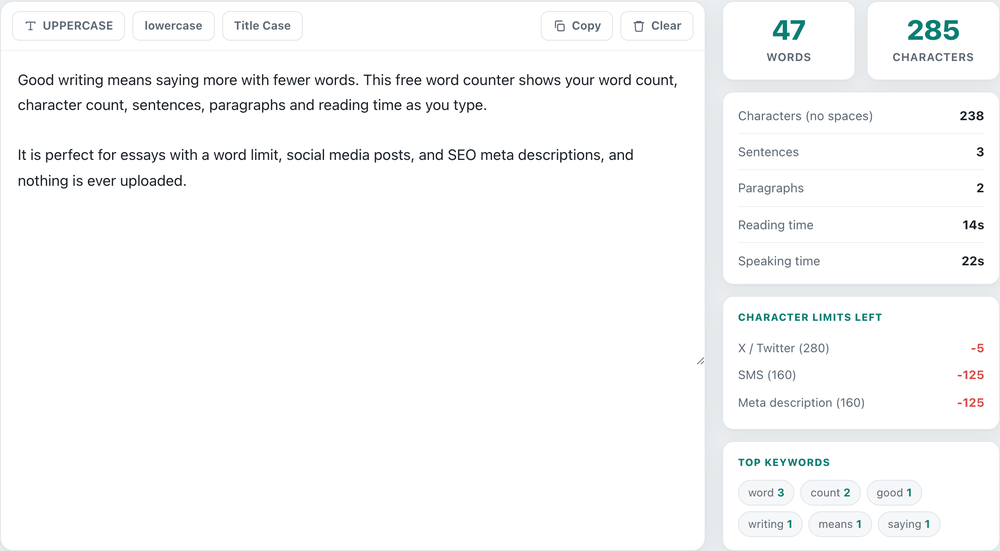
How to count words online
You do not need a special program to count words. Open the free word counter, then type or paste your text into the box. The word count and character count update instantly as you go, along with sentences, paragraphs and reading time. Nothing is uploaded, so your text stays private on your device.
Words vs characters (with and without spaces)
Some limits count words and some count characters, so the tool shows both. It even shows the character count with spaces and without spaces, because different forms count them differently. A quick guide:
- Essays and reports almost always use a word count limit.
- Social media posts use a character count, for example a 280-character limit on X (Twitter).
- SEO titles and meta descriptions use characters too, so they don't get cut off in Google.
Count characters for social media and SEO
The tool shows how many characters you have left for an X (Twitter) post (280), an SMS (160), and a meta description (160), and the number turns red when you go over. That makes it a handy character counter for Twitter, Instagram captions, or writing a meta description that fits.
Count words in an essay
To count words in an essay, paste it into the box and read the word count at the top. The sentence and paragraph counts help you see the structure, and the reading time tells you roughly how long it takes to read, estimated at about 200 words per minute.
Is my text private?
Yes. All the counting happens in your browser, so your writing is never uploaded to a server. The tool also saves your text in your own browser so it is still there if you come back, and you can clear it any time. It is a free online word and character counter with no sign-up.
Count your words now
Words, characters, sentences and reading time, live as you type. Free, no sign-up, nothing uploaded.
Open the Word Counter →