Home / Learn / Privacy / Temporary Email
Temporary Email Explained: The Complete Guide to Temp Mail
Learn how temporary email works, when a disposable inbox is useful, what it can and cannot protect, and how to use temp mail responsibly without putting important accounts at risk.
Temporary email is a short-lived inbox used to receive messages without giving a website your primary email address. It is useful for low-risk, one-time tasks such as basic verification, testing, or accessing a temporary resource. A disposable email address can reduce unwanted follow-up messages, but it is not a replacement for a secure personal email account and should never be used for banking, healthcare, work, purchases you may need to recover, or any account you expect to keep.
| Category | Online privacy |
| Skill level | Beginner |
| Reading time | About 13 minutes |
| Best for | Low-risk, short-term signups and testing |
| Not for | Important, sensitive, paid, or recoverable accounts |
| Related tool | Free Temp Tools Temp Mail |
In this guide
What Is Temporary Email?
Temporary email is an email address designed for short-term use. It gives you an inbox that can receive messages without requiring you to disclose the personal address you use for everyday communication. Depending on the service, the address or mailbox may expire after a fixed period, after inactivity, or when the browser session ends.
The same basic service is commonly described as temp mail, disposable email, disposable mail, throwaway email, burner email, one-time email, or a temporary inbox. These names usually refer to the same idea: an address intended for a limited task rather than a permanent digital identity.
A temporary email generator typically creates an address immediately. You copy it, enter it on a website, and return to the temporary inbox to read a confirmation message, verification link, or one-time code. There is usually no account-registration process for the mailbox itself.
A temporary email address is real enough to receive messages. A randomly invented or "fake" email address often cannot receive anything. For verifications, you need a functioning temporary inbox, not an address that merely looks valid.
Why Temporary Email Exists
Your primary email address often becomes a persistent identifier. It can connect registrations, purchases, subscriptions, newsletters, and account-recovery activity over many years. Sharing it with every site you visit increases the number of organizations that can contact you and the number of systems in which the address may be stored.
A disposable email address creates separation. Instead of using the same personal inbox for a brief interaction, you use a short-lived address for the short-lived task. This can help keep routine marketing messages away from your main inbox and reduce how widely your everyday email address is distributed.
That separation is useful, but limited. Temp mail does not make the rest of your browsing invisible. A website may still observe information such as your IP address, browser characteristics, cookies, account activity, or anything you voluntarily submit. Temporary email protects one piece of information: your primary email address.
How Temporary Email Works
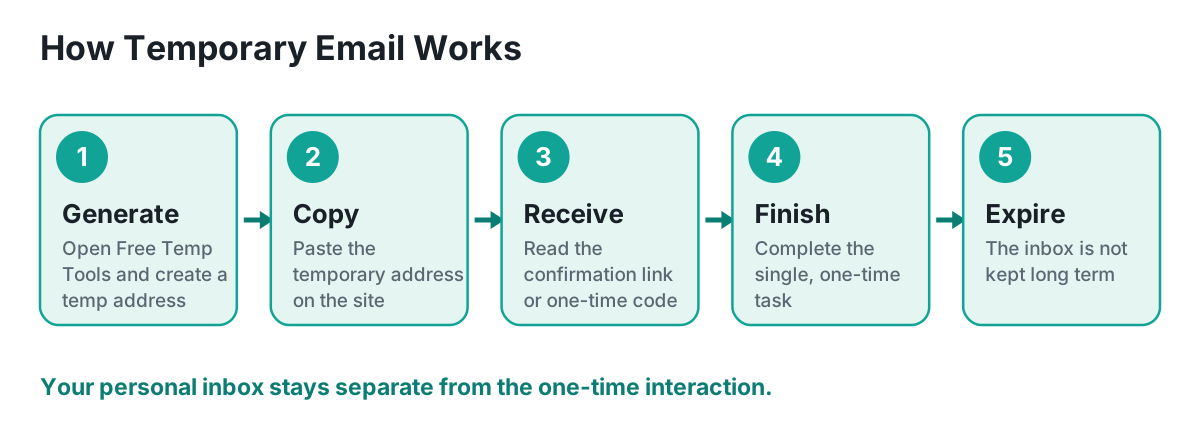
- Open a temporary email service. The service creates an available email address and displays its inbox.
- Copy the generated address. Enter it only where you are comfortable using a short-term mailbox.
- Wait for the incoming message. The temporary inbox may refresh automatically or provide a manual refresh control.
- Open the message and complete the immediate task, such as copying a code or following a confirmation link.
- Assume the inbox will disappear. Do not rely on it for password resets, receipts, account ownership, or future communication.
Try it: open the Free Temp Tools Temp Mail tool to create a temporary inbox for an appropriate low-risk use.
Common Uses for Temp Mail
Temporary email is most appropriate when the task is brief, the stakes are low, and you will not need long-term ownership of the address. Common legitimate uses include:
- One-time website verification when no ongoing account relationship is expected.
- Testing an email workflow while developing or reviewing a website or application.
- Receiving a temporary download link, sample, or basic resource from a site you trust enough to use but do not want to hear from indefinitely.
- Evaluating a newsletter signup flow before using a permanent address.
- Keeping a low-value trial or demonstration separate from a personal inbox.
- Checking whether a service sends the confirmation message it claims to send.
A temporary address should not be used to bypass rules, create abusive accounts, evade enforcement, impersonate someone, or violate a service's terms. The fact that an address is disposable does not make prohibited behavior acceptable.
Benefits of a Disposable Email Address
Less clutter in your primary inbox. A short-lived address can absorb follow-up messages connected to a one-time action, reducing unnecessary newsletters and promotional mail in the inbox you use every day.
Reduced exposure of your personal address. You do not have to hand the same long-term identifier to every site that asks for an email address.
Fast setup. A temporary inbox is usually available immediately, without creating another username and password.
Separation by purpose. Using a temporary address makes it clear that the interaction is temporary. Your personal inbox remains reserved for relationships and accounts that matter.
Convenient testing. Developers, quality-assurance teams, and site owners can use disposable inboxes to check registration and delivery flows without filling permanent test accounts with messages.
Limitations You Should Understand
Temporary email is convenient precisely because it is not designed to behave like a permanent account. That creates important tradeoffs:
- The mailbox may expire before you expect it to.
- You may be unable to recover the address or prove that it belongs to you.
- Messages may not remain available for long.
- Some websites block known disposable email domains.
- A mailbox without a private login may be inappropriate for confidential messages.
- The service may have limits on attachments, message size, sending, or delivery speed.
- An account tied to a temporary address may become impossible to reset or recover.
Use temporary email only when losing the inbox would not create a serious problem. When the account, purchase, message, or relationship matters, use a permanent email address that you control and protect.
When You Should Not Use Temporary Email
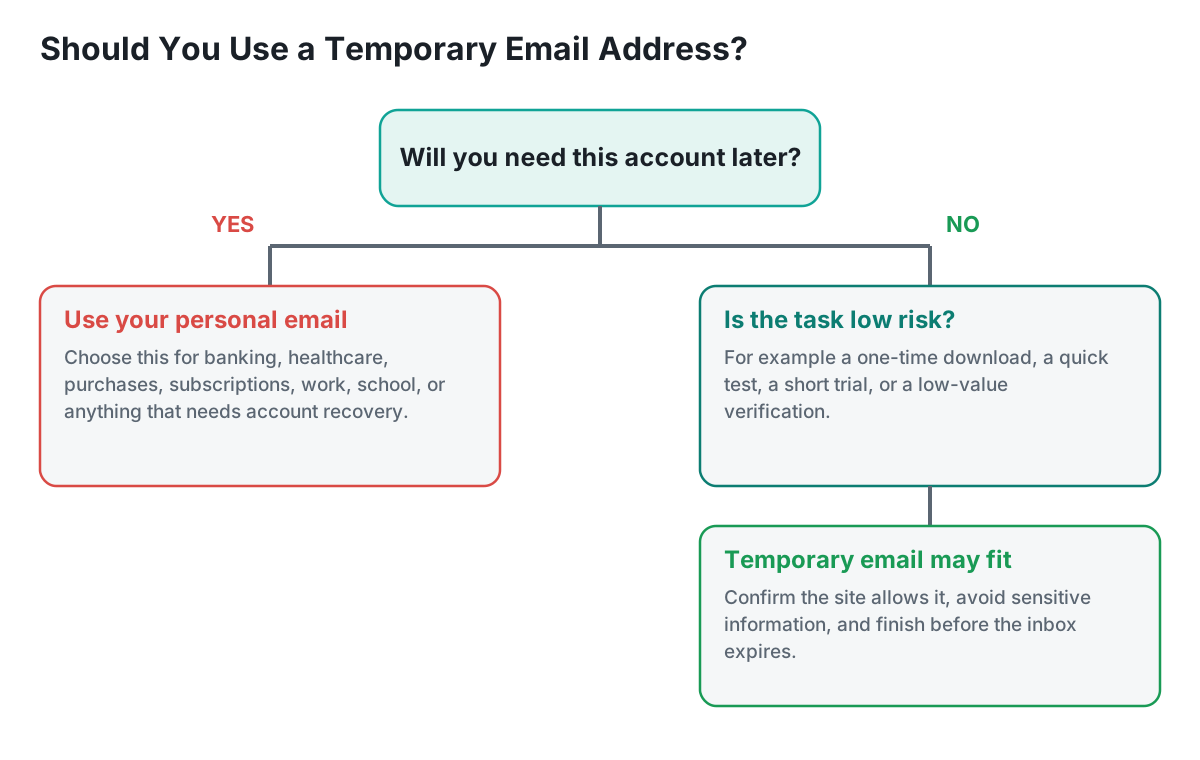
- Banking, credit, investments, taxes, insurance, or payment services.
- Healthcare portals, laboratory results, prescriptions, or medical communication.
- Government, legal, immigration, licensing, or identity-related services.
- Work, school, professional certifications, or client communication.
- Purchases, warranties, bookings, subscriptions, or deliveries you may need to manage later.
- Password managers, cloud storage, social accounts, domain names, or other services that control valuable data.
- Any account where losing access could cost money, time, identity, reputation, or important records.
Try a temporary inbox now
Reading about it only goes so far. Generate a disposable address and use it for the next sign-up you would rather not give your real one to.
Open Temp Mail →Temporary Email vs Personal Email
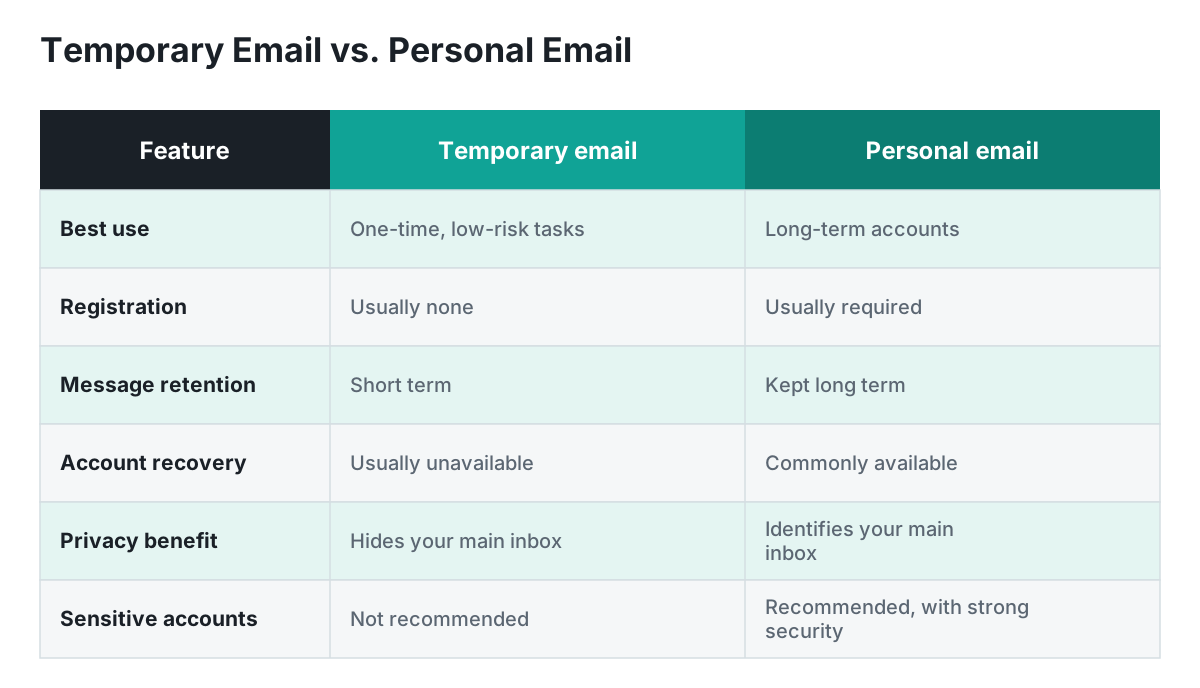
The better choice depends on the expected lifespan and importance of the interaction. Temporary email is optimized for convenience and separation. Personal email is optimized for continuity, recovery, and an ongoing identity.
| Situation | Recommended choice | Why |
|---|---|---|
| One-time, low-risk verification | Temporary email | You need the message now and do not expect to return. |
| Testing a signup form | Temporary email | Keeps test messages separate from permanent accounts. |
| Online purchase | Personal email | You may need receipts, shipping updates, returns, or support. |
| Bank or medical portal | Personal email | Security, recovery, and reliable long-term access are essential. |
| Newsletter you genuinely want | Personal email or dedicated alias | You expect an ongoing relationship and want control over delivery. |
| Account you may use next year | Personal email | A disposable inbox may no longer exist when recovery is needed. |
Is Temporary Email Safe?
Temporary email can be safe for an appropriate low-risk purpose, but "safe" depends on what you receive, what information you disclose, and how the mailbox is protected. A disposable inbox should be treated as a convenience layer, not a secure vault.
Do not place sensitive information in the inbox
Avoid using temp mail for financial details, identity documents, medical information, private work material, confidential attachments, or anything you would not want exposed. Assume that a short-term mailbox offers less control and fewer recovery options than a well-secured personal account.
Examine links before opening them
A temporary inbox does not make a suspicious message safe. Verify the sender and destination before opening a link or attachment. If a message is unexpected, poorly written, or asks for credentials or payment information, treat it cautiously.
Does temp mail make you anonymous?
No. Temporary email can hide your primary email address from the site where you use it, but that is not the same as anonymity. Websites and network services may still connect activity using IP addresses, cookies, browser storage, device characteristics, login behavior, payment details, or information you submit. It is more accurate to describe temporary email as an email-separation tool.
Best Practices for Using a Temporary Inbox
- Use it only for low-risk, short-term tasks. Decide first whether you may need the account, receipt, or message later.
- Finish the task promptly. Verification links and temporary inboxes may expire.
- Do not enter sensitive personal information. A disposable address does not protect data you submit elsewhere on the page.
- Never use it as the recovery address for an important account.
- Respect site rules and terms. Some services do not permit disposable addresses.
- Use a strong, unique password for any account you create, even when the account is temporary.
- Close or delete the temporary account when the site offers that option and you no longer need it.
- Use an alias or dedicated permanent address when you want separation plus long-term control.
Temporary email, aliases, and secondary accounts
Temporary email is not the only way to protect your main inbox. The best option depends on whether you need replies, recovery, and ongoing control.
| Option | Lifespan | Best use | Recovery |
|---|---|---|---|
| Temporary email | Short | One-time, low-risk task | Usually limited or unavailable |
| Email alias | Long or user-controlled | Shopping, newsletters, account separation | Often managed through your main account |
| Secondary email account | Long | Ongoing signups kept apart from personal mail | Usually available |
| Primary email account | Long | Important relationships and accounts | Strongest when properly secured |
Common Myths About Disposable Email
Myth: Temporary email is the same as a fake address. A working disposable address can receive email; a made-up address often cannot. The defining characteristic is short-term use, not whether the mailbox functions.
Myth: Temp mail makes every activity anonymous. It only separates your primary email address. Other identifiers may still connect the activity to you.
Myth: Disposable email is only used for harmful activity. People use it for legitimate privacy, testing, quality assurance, and low-risk one-time interactions.
Myth: A temporary inbox is suitable for every signup. It is a poor choice for important accounts, purchases, subscriptions, or anything that may require recovery.
Myth: Temporary means secure. Short lifespan and strong security are different properties. Never place confidential information in a mailbox unless you understand and trust its protections.
Frequently Asked Questions
What is temp mail?
Temp mail is another name for temporary email: a short-lived address and inbox used to receive messages without giving a site your primary email address.
Is disposable email free?
Many temporary email services are free, though available features, mailbox duration, privacy controls, and usage limits vary by provider.
Do I need to register for a temporary inbox?
Often no. Many services generate an address immediately. The exact process depends on the provider.
How long does a temporary email address last?
There is no universal duration. An address may expire after a set time, after inactivity, when the session ends, or according to the provider's retention rules.
Can I send messages from a temporary email address?
Some services support sending, but many are receive-only. Check the specific tool's capabilities and rules.
Can I recover an expired temporary inbox?
Often not. Treat the address and its messages as disposable unless the service explicitly offers a recovery feature.
Can I use temp mail for social media?
It may work technically, but it is risky for any account you want to keep. If the platform requests verification later, you may be unable to regain access.
Can I use disposable email for online shopping?
It is generally better to use a permanent address or managed alias because you may need receipts, shipping notices, returns, warranty information, or account recovery.
Why do some websites reject temporary email addresses?
Sites may block known disposable domains to reduce abuse, enforce account policies, support reliable communication, or ensure users can recover their accounts.
Is a temporary email address legal?
Using a temporary address for ordinary lawful purposes is generally a tool choice, but laws, contracts, and website terms vary. Do not use it to deceive, abuse a service, or violate applicable rules.
Will temp mail stop all spam?
No. It can keep messages tied to that one-time address away from your primary inbox, but it does not stop spam sent to addresses you have already shared elsewhere.
Does temporary email protect my IP address?
No. Email separation does not conceal your network address. A website or service may still observe your IP address and other technical information.
Is temporary email encrypted?
Encryption and transport protections depend on the provider and the sending service. Do not assume confidential end-to-end encryption.
What should I use instead for long-term privacy?
Consider a dedicated secondary email account or an alias service that lets you disable individual aliases while preserving account recovery and long-term control.
What is the safest way to use Free Temp Tools Temp Mail?
Use it for a low-risk, short-term purpose; avoid sensitive information; complete the task promptly; and use a permanent secure email account for anything important.
Ready to use temp mail?
Generate a temporary inbox and use it only for a suitable low-risk task. Never use a disposable address for an account or message you cannot afford to lose.
Open Temp Mail →