How to Avoid Email Spam: 21 Practical Ways to Protect Your Inbox
Email spam is more than an inconvenience. Unwanted messages can bury important emails, expose you to misleading offers, and increase the chance that you interact with a phishing link or malicious attachment. Although no method can guarantee a completely spam-free inbox, a combination of better email habits, built-in filtering tools, account security, and selective use of alternate addresses can reduce the volume and risk substantially.
This guide explains how to avoid email spam without accidentally blocking legitimate messages. It also covers when to unsubscribe, when to report a message as spam, when to block a sender, and when a temporary email address may be appropriate.
To reduce email spam, avoid publishing your primary address, use a separate address for low-trust sign-ups, unsubscribe only from legitimate senders, mark unsolicited messages as spam, block repeat offenders, use email aliases or temporary email for disposable registrations, and secure your account with a unique password and multifactor authentication.
Protect your primary inbox
When a sign-up only needs a one-time code, use a temporary address instead of your real one. Free, instant, no registration.
Open Temp Mail →Key takeaways
- Keep your primary email address private and reserve it for important accounts and trusted contacts.
- Use separate addresses, aliases, or temporary email for lower-trust registrations.
- Unsubscribe from legitimate newsletters, but do not click unsubscribe links in suspicious messages.
- Mark true spam as spam so your provider can improve filtering.
- Block persistent senders, but understand that blocking one address may not stop a rotating spam campaign.
- Never reply to suspicious messages because a response can confirm that your address is active.
- Protect your email account with a unique password, multifactor authentication, and current recovery details.
- Treat unexpected links, attachments, invoices, password alerts, and urgent requests as potential phishing attempts.
What is email spam?
Email spam is unwanted bulk email sent to recipients who did not meaningfully request it or no longer want it. Spam may advertise products, promote questionable services, spread scams, distribute malware, or attempt to steal personal information.
Not every unwanted message is malicious. A legitimate store may send promotional emails after you agreed to receive them. A newsletter you once wanted may simply no longer be useful. Those messages are usually better handled through a trusted unsubscribe option.
By contrast, malicious spam often arrives without a valid relationship between you and the sender. It may use deceptive subject lines, impersonate recognizable brands, create false urgency, or direct you to a fake sign-in page. This overlap is why good inbox management requires more than deleting everything you dislike.
Spam, junk email, phishing, and marketing email
| Type of message | What it usually means | Best first action |
|---|---|---|
| Legitimate marketing email | You subscribed, purchased something, or gave permission | Unsubscribe or change communication preferences |
| Unwanted but recognizable email | The sender is real, but you no longer want the messages | Unsubscribe; block if messages continue |
| Spam | Unsolicited bulk email with little or no legitimate relationship | Mark as spam or junk |
| Phishing | A deceptive message designed to steal information or trigger an unsafe action | Do not click; report as phishing |
| Malware delivery | A message containing or linking to harmful software | Do not open attachments; report and delete |
| Transactional email | Receipts, password resets, account alerts, or one-time codes | Verify the sender and keep if legitimate |
Understanding the difference matters. Reporting a legitimate newsletter as spam may affect future delivery from that sender, while clicking an unsubscribe link in a fraudulent message could expose you to further risk.
Why am I getting so much spam email?
Spam usually reaches an inbox because the address became known, was shared, was guessed, or was exposed.
You used the same address everywhere
Using one email address for banking, shopping, newsletters, contests, downloads, discussion forums, and public profiles creates a single point of exposure. If any service shares, sells, mishandles, or loses the address, spam can follow.
Your address appeared in a data breach
A breached account database may contain email addresses, names, passwords, phone numbers, or other details. Even when the stolen password is old, the address can remain useful to spammers and scammers.
Your address is publicly visible
Addresses posted on websites, business directories, social profiles, forums, resumes, or public documents may be collected automatically. Spammers use software to scan public pages for recognizable email patterns.
You entered it into a low-trust form
Giveaways, coupons, unofficial download pages, surveys, quizzes, and free-resource forms sometimes collect addresses primarily for marketing or resale. A privacy policy does not always mean the service uses data responsibly.
You responded to or interacted with spam
Replying, loading remote content, or following a suspicious link may help a sender determine that the address is active. That can make the address more valuable for future campaigns.
The address was guessed
Spammers can generate common address combinations such as [email protected], [email protected], [email protected], or short usernames at popular providers. A message does not prove that your information was stolen.
How to avoid email spam
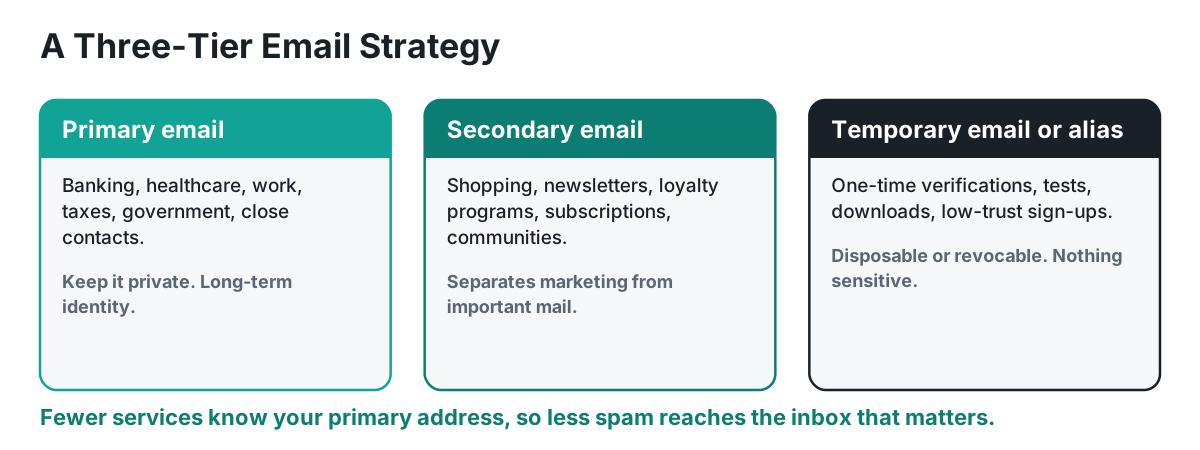
The most effective strategy is layered. One action may reduce a particular sender, but several habits together provide stronger and more durable protection.
1. Keep your primary email address private
Treat your primary address as a high-value identifier. Use it for financial accounts, government services, healthcare portals, employment, close contacts, and other relationships where continuity matters.
Before sharing it, ask:
- Do I trust this website?
- Is email truly required?
- Will I need access to this account months or years from now?
- Can I use an alias, secondary address, or temporary inbox instead?
- Does the site explain how it uses and shares contact information?
The fewer organizations that know your primary address, the fewer opportunities there are for unwanted email.
2. Use a separate email address for shopping and newsletters
A dedicated secondary address can isolate marketing messages from important personal communication. Use it for retail accounts, loyalty programs, newsletters, travel alerts, event registrations, and similar services.
A practical setup is:
- Primary address: banking, healthcare, employment, taxes, close contacts
- Secondary address: shopping, newsletters, subscriptions, online communities
- Temporary address or alias: short-term, low-trust, or one-time registrations
3. Use temporary email for appropriate short-term sign-ups
A temporary email address can help keep your permanent inbox private when you need to receive a short-lived confirmation, download link, or access code from a service you do not expect to use long term.
Temporary email is most appropriate when:
- You need a one-time verification message.
- You are testing a website or app.
- You want to preview a resource before deciding whether to subscribe.
- You do not need password recovery or long-term account access.
- The service is low-risk and does not involve sensitive information.
Do not use temporary email for banking, healthcare, legal matters, tax services, employment, cryptocurrency accounts, purchases requiring support, or any account you may need to recover later. Temporary inboxes may expire, and access may not be permanent.
4. Use email aliases when you need long-term access
An email alias forwards messages to your main inbox without revealing the underlying address. Unlike a short-lived temporary inbox, an alias may remain active for months or years and can often be disabled individually.
Aliases are useful for online stores, app accounts, newsletters, memberships, travel bookings, and services that require future password resets. A unique alias for each service can also help identify which organization leaked or shared an address.
5. Read forms before submitting your address
Many registration forms include optional marketing consent. Look for preselected newsletter boxes, partner-offer checkboxes, promotional consent, data-sharing language, and terms that combine account creation with advertising permission. Clear any optional boxes you do not want.
6. Avoid posting your email address publicly
Public email addresses can be collected by automated tools. Avoid placing your main address in social media bios, public comments, forum signatures, public resumes, unprotected contact pages, online directories, or images with readable contact information.
Businesses that must publish an address can use a role-based address, contact form, or separate public-facing mailbox.
7. Unsubscribe from legitimate email you no longer want
Unsubscribing is appropriate when you recognize the sender and remember subscribing, creating an account, or making a purchase.
Safer unsubscribe methods include:
- Your email provider’s built-in unsubscribe button
- The sender’s account settings
- The sender’s official website, reached independently
- A clearly identified preference center
It may take several days for legitimate senders to process an unsubscribe request.
When not to unsubscribe
Do not click an unsubscribe link when you do not recognize the sender, the message contains obvious inconsistencies, the email asks for credentials or payment, the link looks unrelated, the message creates unusual urgency, or your provider has flagged it as suspicious. Use Report spam or Report phishing instead.
Stop spam before it starts
Filtering helps, but the durable fix is never handing your real address to the sites that generate the spam in the first place.
Get a temporary inbox →8. Mark unsolicited messages as spam or junk
Deleting spam removes one message. Reporting it helps your provider identify similar messages. Major email services use spam reports as one signal in their filtering systems.
Use the spam or junk option when you never requested the message, the sender is unknown, the content is bulk advertising or deceptive, the same campaign repeatedly reaches your inbox, or the message appears designed to test whether your address is active.
9. Report phishing separately from ordinary spam
Phishing is a security threat, not just inbox clutter. A phishing email attempts to steal credentials, financial information, identity data, or access to your device.
Common signs include:
- An unexpected password-reset notice
- A fake invoice or delivery problem
- A request to verify your account
- A link to a look-alike sign-in page
- An urgent request from a manager or relative
- A demand for gift cards, wire transfers, or cryptocurrency
- An attachment you were not expecting
- A sender name that looks correct but an address that does not
Use your provider’s Report phishing function. If the message might be real, reach the organization through its official app, a bookmarked site, or a phone number you already trust.
10. Block persistent senders
Blocking is useful when the same recognizable sender continues contacting you. Blocking is less effective against large spam campaigns because senders often rotate addresses and domains. For those messages, reporting spam is usually more useful than building a long block list.
11. Create filters and rules carefully
Email rules can automatically move, label, archive, or delete messages based on sender, subject, recipient, or keywords.
Useful examples include:
- Move newsletters to a Subscriptions folder.
- Label receipts automatically.
- Move messages sent to a shopping alias into a separate folder.
- Flag messages from trusted institutions.
- Archive routine notifications.
Avoid broad deletion rules based on words such as invoice, security, account, or payment. Legitimate messages may use the same terms. Test filters by moving messages to a folder before choosing permanent deletion.
12. Do not reply to suspicious spam
A reply can confirm that your address is active. It may also expose your name, signature, workplace details, phone number, or other information. Do not send replies such as Stop emailing me, Remove me from your list, or Who is this? Use provider controls instead.
13. Do not click unknown links or open unexpected attachments
A link may lead to a fake sign-in page, malicious download, fraudulent payment page, or tracking system. Attachments may contain harmful code or documents designed to persuade you to enable unsafe features.
Before interacting:
- Confirm that you expected the message.
- Check the full sender address, not only the display name.
- Hover over links on a computer to preview the destination.
- Look for misspelled or substituted domains.
- Contact the sender through a separate channel when uncertain.
- Open the organization’s official app or website directly instead of using the message link.
14. Turn off automatic loading of remote images when needed
Some email images are loaded from a remote server. The request can reveal that a message was opened and may expose limited technical information. Provider protections vary. People at higher risk may choose to disable automatic image loading and load images only for trusted senders.
15. Use a unique password for your email account
Your email account is often the recovery channel for other services. Use a long, unique password that is not reused anywhere else. A password manager can generate and store unique passwords securely.
16. Enable multifactor authentication
Multifactor authentication requires an additional verification step beyond a password. Prefer stronger methods supported by your provider, such as passkeys, security keys, authenticator apps, or device prompts. Text-message codes are generally better than password-only access, although they may be less resistant to certain attacks than passkeys or security keys.
17. Review forwarding rules, filters, and account sessions
If spam suddenly increases or messages disappear unexpectedly, review automatic forwarding addresses, inbox rules, connected apps, recent login activity, recovery details, app-specific passwords, and delegated mailbox access. Remove anything you do not recognize and change your password from a trusted device.
18. Keep your browser, operating system, and email apps updated
Updates fix security weaknesses and improve protection against malicious links, unsafe attachments, and account compromise. Enable automatic updates where practical. Remove browser extensions and email add-ons you no longer use.
19. Be selective with loyalty programs, contests, and giveaways
Discounts and giveaways are common sources of marketing email. Before participating, consider whether the value is worth sharing your address. Use a secondary address or alias when future access may matter. Use temporary email only when the registration is disposable and the service permits it.
20. Search for and clean up old subscriptions
Search for terms such as unsubscribe, newsletter, preferences, promotion, weekly update, and daily digest. Review the sender before taking action. Use your provider’s subscription-management feature when available. A monthly ten-minute cleanup can prevent subscriptions from accumulating again.
21. Consider changing an address only as a last resort
Creating a new address can be effective when an old address is overwhelmed, publicly exposed, or repeatedly targeted. Before replacing an address:
- Strengthen account security.
- Review forwarding and filter settings.
- Report spam consistently for several weeks.
- Unsubscribe from legitimate lists.
- Move shopping and newsletters to a secondary address.
- Update critical accounts first.
- Keep the old address active temporarily for transition.
Do not automatically forward every old message to the new inbox, because that may transfer the same spam problem.
What should you do when spam reaches your inbox?
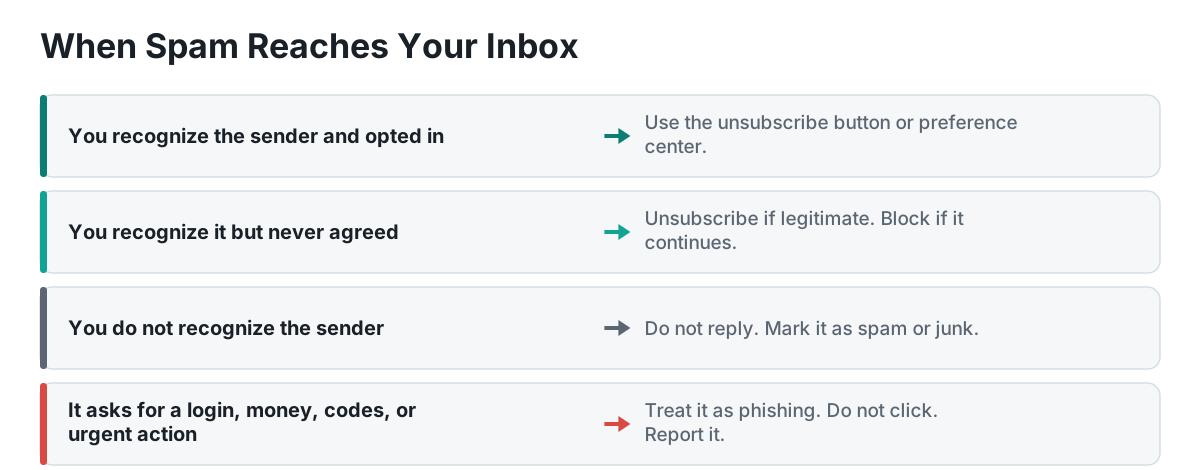
If you recognize the sender and previously opted in
Use the provider’s unsubscribe button or the sender’s official preference center.
If you recognize the sender but never agreed to marketing
Unsubscribe if the sender is clearly legitimate. If messages continue, mark them as spam or block the sender.
If you do not recognize the sender
Do not reply. Mark the message as spam or junk.
If the message requests credentials, money, codes, or urgent action
Treat it as phishing. Do not click. Report it through your email provider.
If the message might be legitimate but you are unsure
Open the organization’s official website or app independently. Contact the person or company using information you already trust.
How to stop spam emails in Gmail
Gmail includes reporting, blocking, filtering, and unsubscribe controls.
- Report spam: Select the message and choose Report spam.
- Report phishing: Open the message, use the additional-options menu, and choose Report phishing.
- Block a sender: Open a message, use the additional-options menu, and select Block sender.
- Unsubscribe: For recognized promotional messages, use Gmail’s unsubscribe option near the sender information when available.
- Manage subscriptions: Some Gmail accounts provide a centralized Manage subscriptions feature. Availability may vary.
How to stop spam emails in Outlook
Outlook provides junk reporting, blocked-sender lists, safe-sender lists, rules, and subscription management.
- Mark a message as junk or report phishing using Outlook’s reporting controls.
- Depending on the Outlook version, block addresses or domains under Settings > Mail > Junk email.
- Outlook.com may show subscription management under Settings > Mail > Subscriptions.
- Add important senders to a safe-sender list only when you trust the exact address or domain.
Interface labels and retention periods can change, so consult current provider documentation for your version.
Can temporary email prevent spam?
Temporary email can prevent a low-trust registration from exposing your permanent inbox. It is especially useful when you need one short-lived message and do not need the account later.
Temporary email cannot remove spam already reaching your permanent address, protect an insecure permanent mailbox, guarantee anonymity, replace account security, preserve long-term recovery access, or make a suspicious website trustworthy.
Think of temporary email as compartmentalization. It limits which services receive your permanent address.
Email spam prevention checklist
- My primary email is reserved for important accounts.
- I use a secondary address for shopping and newsletters.
- I use aliases or temporary email for appropriate lower-trust sign-ups.
- I do not publish my primary address publicly.
- I clear optional marketing checkboxes.
- I unsubscribe only from legitimate senders.
- I report unsolicited bulk messages as spam.
- I report credential-stealing messages as phishing.
- I do not reply to suspicious messages.
- I verify unexpected links and attachments independently.
- My email password is unique.
- Multifactor authentication is enabled.
- Recovery information is current.
- Forwarding rules, filters, and connected apps are reviewed.
- My devices and email applications are updated.
- I periodically clean up old subscriptions.
Common mistakes that make spam worse
Using one email address for everything
This makes it harder to identify the source of exposure and harder to separate important messages from marketing.
Clicking unsubscribe in obvious scams
A fake unsubscribe link may confirm activity or lead to a malicious page.
Replying to demand removal
Replies can validate the address and reveal additional information.
Blocking every individual spam address
Large campaigns frequently change addresses. Reporting spam is usually more scalable.
Creating filters that delete too broadly
A broad keyword rule can hide real security alerts, receipts, or account notices.
Using temporary email for permanent accounts
You may lose password-reset access, transaction records, or support communication.
Assuming a familiar logo means the message is real
Branding is easy to copy. Verify the sender address and destination independently.
Frequently asked questions
How can I permanently stop spam emails?
You usually cannot stop every spam message permanently. You can reduce spam by keeping your primary address private, using separate addresses or aliases, unsubscribing from legitimate lists, reporting true spam, blocking persistent senders, and securing your account.
Why am I suddenly receiving hundreds of spam emails?
A sudden surge may result from a newly exposed address, a spam campaign, or an email bomb intended to hide an important security or purchase alert. Search for password resets, account changes, receipts, and financial alerts. Review account activity and forwarding rules, then report unwanted messages.
Is it safe to unsubscribe from spam email?
It is generally safe to unsubscribe from a legitimate company or newsletter you recognize. Do not use unsubscribe links in suspicious messages. Report those as spam or phishing instead.
Does blocking spam emails work?
Blocking works well for a persistent sender using the same address. It is less effective against campaigns that rotate addresses or domains. Reporting spam helps your provider detect broader patterns.
Should I delete spam or mark it as spam?
Marking it as spam is usually better than deleting it because the report may improve future filtering. After reporting, the provider typically moves the message to the spam or junk folder.
Can opening a spam email cause a virus?
Simply viewing a message in a modern, updated email service is generally less risky than clicking a link, opening an attachment, enabling macros, or installing software. Keep software updated and avoid interacting with suspicious content.
Can spammers tell that I opened an email?
Some senders use remote images or tracking links to infer that a message was opened or clicked. Provider protections vary. Avoid clicking suspicious links, and consider disabling automatic image loading if tracking is a concern.
Why does spam keep returning after I block the sender?
Spammers may use new addresses, spoofed identities, compromised accounts, or changing domains. Continue reporting messages as spam rather than relying only on blocking.
Is temporary email safe?
Temporary email is useful for low-risk, short-term registrations, but it should not be used for sensitive or permanent accounts. Inbox availability, privacy, and recovery options vary by provider.
Should I use my real email for online shopping?
For established stores where you need receipts, returns, warranty support, or account recovery, use a stable secondary address or alias. A temporary inbox may be inappropriate because you may need those messages later.
What is the difference between spam and phishing?
Spam is broadly unwanted email. Phishing is a deceptive attempt to steal information, money, credentials, or access. A phishing email may also be spam, but it requires a security-focused response: do not click, report it, and verify independently.
What should I do if I clicked a phishing link?
Close the page and do not enter information. If you entered a password, change it immediately from the official site, sign out other sessions, and enable multifactor authentication. If financial or identity information was exposed, contact the relevant institution and follow official identity-theft guidance.
Put a disposable address between you and the sign-up form
It takes about ten seconds and keeps your primary inbox out of marketing lists and breach dumps.
Open Temp Mail →Final thoughts
Avoiding email spam is not about finding one perfect setting. It is about reducing exposure, separating different uses, training your provider’s filters, and responding safely when unwanted messages arrive.
Start with three changes:
- Reserve your primary address for important relationships.
- Use a secondary address, alias, or temporary email for lower-trust sign-ups.
- Report suspicious messages instead of replying or clicking.
These habits make an inbox easier to manage and reduce opportunities for phishing and account compromise.
Related FreeTempTools resources
Editorial and safety note
This guide provides general educational information. Email-provider features and interface labels may change. Always use current provider documentation, and contact the relevant organization through a trusted channel when a message involves sensitive information, account security, or money.